What Is an APK? A Complete Guide to Android APK Files
If you have ever downloaded an Android app outside the Google Play Store, you have probably seen a file ending in .apk. But what exactly is an APK, and what does it do?
APK stands for Android Package Kit. It is the installable package format used by Android to distribute and install applications. An APK contains the files and information Android needs to install and run an app on a device.
Most people install apps through Google Play and never need to handle an APK file directly. However, APK files are also used for testing, alternative app distribution, installing certain apps manually, and deploying custom applications.
In this guide, you will learn what an APK is, what is inside an APK file, how APK installation works, what sideloading means, whether APK files are safe, and how APK differs from formats such as XAPK and APKM.
What Is an APK?
An APK is an Android application package that can be installed on an Android device.
You can think of an APK as a container that brings together the code, resources, permissions, metadata, and other files an Android application needs.
For example, if an app developer creates an application called ExampleAppits release may be packaged as something like:
When Android processes a compatible APK, it uses the information inside the package to install the application on the device.
A simple way to understand it is:
APK file → Android reads the package → Android verifies it → app is installed → you can use the app
An APK is therefore not the same thing as the app itself in the everyday sense. The APK is the package used to install the application.
Simple example
Imagine you want to install an Android app manually.
Instead of opening Google Play and tapping Install, you receive an .apk file from a website or another legitimate source. You open that file on your Android phone, follow the installation prompts, and Android installs the application.
That .apk file is the APK package.
What Does APK Stand For?
APK stands for Android Package Kit.
The name describes its purpose:
- Android — it is designed for Android applications.
- Package — it bundles the files needed for an application.
- Kit — it is a packaged set of application files and information.
You may also see people simply call it an Android package or APK file.
The important thing to remember is that APK is an Android application package format.
How Does an APK File Work?
An APK works by bringing the different parts of an Android application together in one installable package.
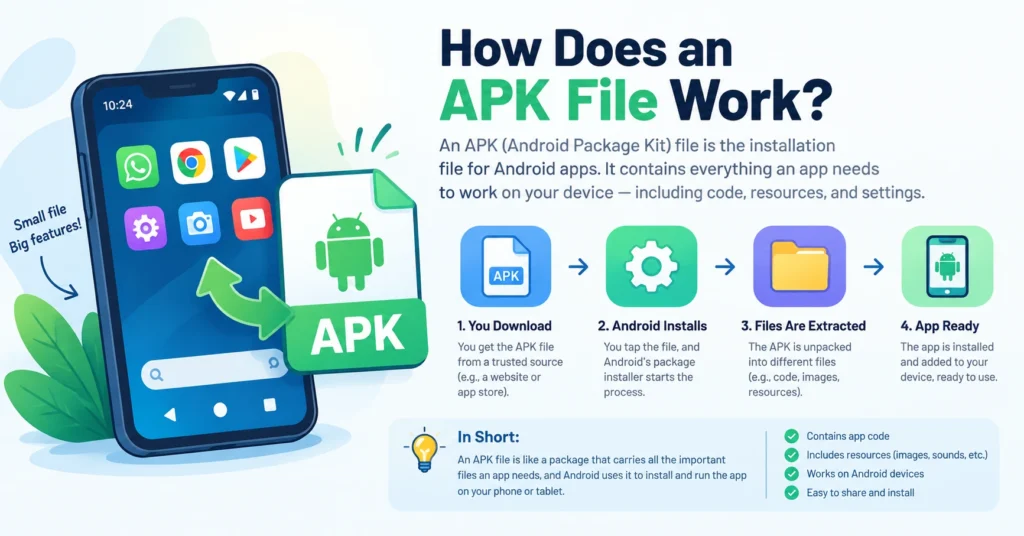
At a basic level, the process looks like this:
- A developer creates an Android application.
- The application is built and packaged.
- The resulting APK contains the application’s code and resources.
- The APK is digitally signed.
- The APK is distributed through a store, website, private system, or another channel.
- Android processes the package during installation.
- The application becomes available on the device.
Android requires APKs to be digitally signed before they can be installed or updated. App signing also helps Android identify whether an update is associated with the same signing identity as the installed application.
An APK does not have to come directly from Google Play. Developers can distribute release-ready APKs through websites or private/enterprise channels as well.
What Is an APK Used For?
APK files have several legitimate uses.
Installing Android apps
The most obvious use of an APK is installing an Android application.
Google Play normally handles this process automatically, so most users never see the APK file itself.
Updating applications
APK packages can also be used to install a newer version of an existing application when the package is compatible with the installed version and signing requirements.
Testing applications
Developers and testers may use APK files to test Android applications before or outside normal public distribution.
Installing apps outside Google Play
Some applications may be distributed through a developer’s website, an enterprise system, or another legitimate app distribution channel.
Installing an older version
In some situations, users may need an older compatible version of an application. Installing an older APK can be useful in specific cases, although users should consider security and compatibility before doing so.
Offline app distribution
An APK can also be transferred between devices or stored for later installation, provided the package is compatible and obtained from a trustworthy source.
What Is Inside an APK File?
An APK is more than just one piece of application code. It is a package containing several types of files.
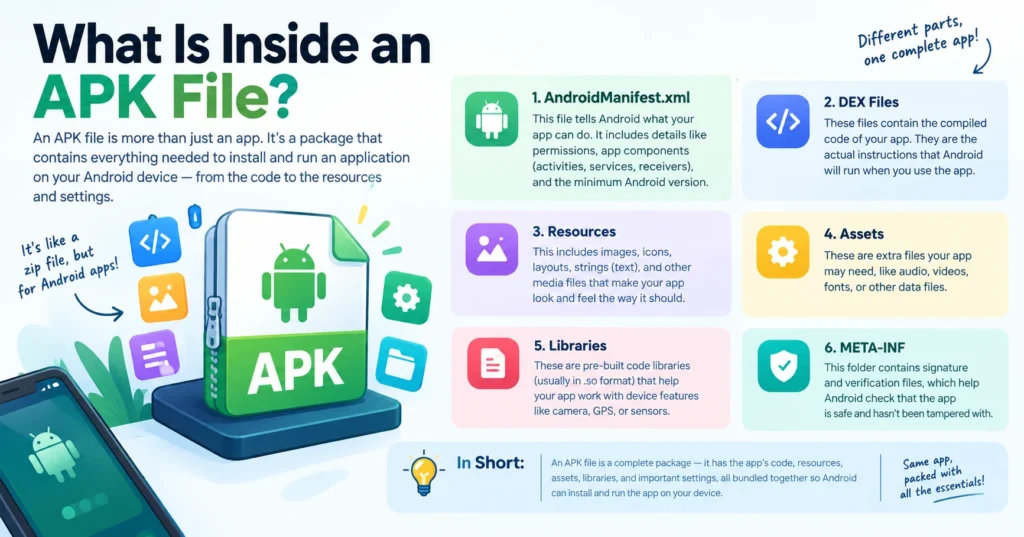
The exact contents can vary from one application to another, but common components include the following.
AndroidManifest.xml
The AndroidManifest.xml file contains important information about the application.
It can describe things such as:
- The app’s package identity
- Required permissions
- App components
- Supported Android requirements
- Application metadata
- Other information Android needs to understand the application
You can think of the manifest as an important information file that tells Android how the application is structured and what it requires.
classes.dex
The classes.dex file contains compiled application code in the DEX (Dalvik Executable) format.
This is the code Android uses to execute the application’s logic.
An application can contain more than one DEX file, especially when it has a large amount of code.
resources. arsc
The resources.arsc file contains compiled application resources.
These can include information such as:
- Text strings
- Colors
- Styles
- Other compiled resources
It allows Android to access application resources efficiently.
res Folder
The res folder contains application resources used by the app.
Depending on the application, these can include:
- Images
- Layout files
- Icons
- XML resources
- Other interface-related resources
These files help determine how the application looks and behaves.
assets Folder
The assets folder can contain files that the application needs in their original or raw form.
For example, an app might include:
- Fonts
- Audio files
- Text files
- Other application-specific resources
Not every APK uses the folder in the same way.
lib Folder
The lib directory can contain native libraries used by the application.
These libraries may be compiled for particular processor architectures and can provide functionality that is not handled entirely by the application’s main code.
META-INF and App Signing Information
APK packages can contain metadata and signature-related information used to verify the package.
Android uses application signing as part of its security model. A valid signing identity is important when installing and updating applications.
It is important to note that being digitally signed does not automatically mean an APK is safe. A malicious application can also be signed. The source and trustworthiness of the application still matter.
APK vs App: What Is the Difference?
The terms APK and app are related, but they are not the same thing.
| Feature | APK | Installed App |
|---|---|---|
| What is it? | Installation package | Application installed on Android |
| File extension | .apk | Usually no visible file extension |
| Main purpose | Install/distribute an app | Run and use the application |
| Can be downloaded as a file? | Yes | Usually accessed through the installed system |
| Can be installed? | Yes | Already installed |
A simple example makes this easier.
If you downloadExampleApp.apk, you have the installation package.
After Android installs it, you have the ExampleApp application on your phone.
How Are APK Files Created?
APK files are produced as part of the Android application build process.
A developer normally starts with application source code and resources. Development tools then compile and package these materials into a format Android can install.
A simplified process looks like this:
Source code + resources → Build process → APK → Signing → Distribution
Android Studio is one of the main development environments used for Android applications.
During the build process, application code is compiled, resources are processed, and the required files are packaged together.
The resulting release APK must also be appropriately signed.
Modern Android development commonly uses the Android App Bundle (AAB) as a publishing format for app stores such as Google Play. An AAB itself is not installed directly on an Android device; it is processed to produce the APKs needed for particular devices.
APK vs Google Play Store
An APK and Google Play Store are two completely different things.
APK:
An installable Android application package.
Google Play Store:
A platform used to distribute Android applications.
When you install an app through Google Play, you normally do not manually download and open an APK. Google Play handles the distribution and installation process.
However, Android applications can also be distributed through other legitimate channels, including websites and private or enterprise systems.
This is why you may encounter an APK even if you normally use Google Play.
How to Install an APK on Android
The exact steps can vary depending on your Android version and phone manufacturer, but the general process is straightforward.
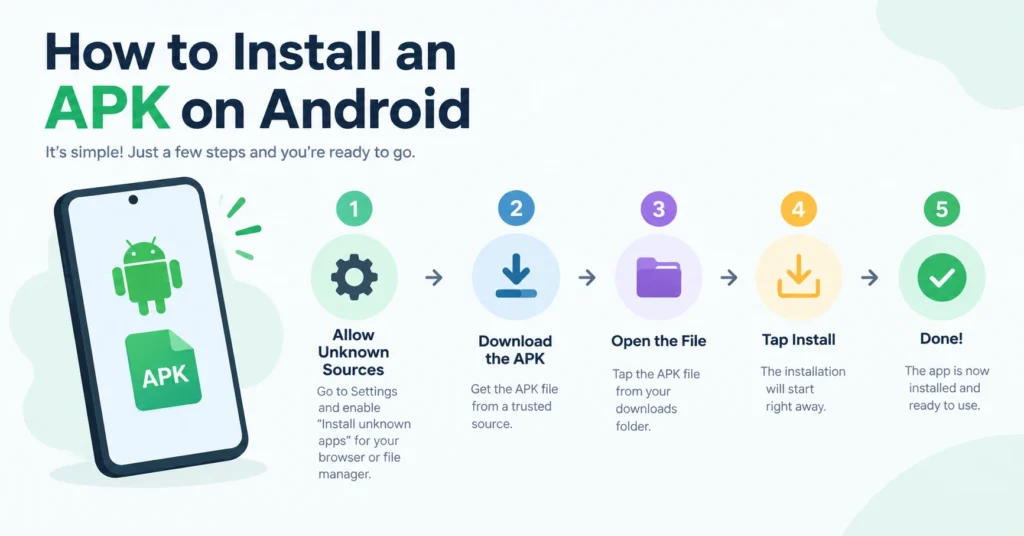
1. Download the APK
Get the APK from a source you trust.
Avoid downloading random files from suspicious websites, pop-ups, or unknown links.
2. Find the APK File
After downloading it, open your phone’s file manager or download folder and locate the .apk file.
3. Allow Installation From the Source
On newer Android versions, you may need to allow the particular app you are using—such as your browser or file manager—to install unknown apps.
The setting is usually called Install unknown apps or something similar.
The exact menu can vary by Android version and manufacturer.
4. Open the APK
Tap the APK file to start the installation process.
Android may show information about the application and request confirmation.
5. Review the Installation
Before continuing, consider whether the application and its requested permissions make sense.
If something seems suspicious, stop the installation.
6. Install the App
If you trust the APK and it is compatible with your device, follow the on-screen instructions to install it.
7. Open the Application
Once installation is complete, you can open the app normally.
8. Review Installation Permissions
If you temporarily enabled installation from an unknown source, consider turning that permission back off when you no longer need it.
Android’s current installation controls are designed to require user approval for applications coming from sources outside trusted app stores.
What Is Sideloading on Android?
Sideloading means installing an application on a device through a source other than the normal app store.
For example, downloading an APK from a website and manually installing it is generally considered sideloading.
Sideloading can have legitimate uses, such as:
- Testing an application
- Installing an enterprise application
- Installing an app distributed by its developer
- Accessing an app that is not available through a particular store
However, sideloading also requires more responsibility from the user because the application may not have gone through the same distribution and review process as an app obtained through an official store.
Why Do People Install APK Files?
There are several reasons someone might use an APK instead of installing an app through Google Play.
The app is unavailable on Google Play
An application may not be listed in a particular country or region.
The developer distributes the app directly
Some developers provide APK downloads through their own websites or private distribution systems.
Testing a new application
Developers and testers may need to install specific APK builds during development.
Installing an older version
A user may need a previous compatible version for a particular device or software environment.
Offline installation
An APK can be stored and transferred for later installation.
Business or enterprise deployment
Organizations can distribute custom Android applications to managed devices.
For example, Android MDM systems can upload custom APKs and deploy them to selected managed devices.
Can You Install APK Files on Windows or iPhone?
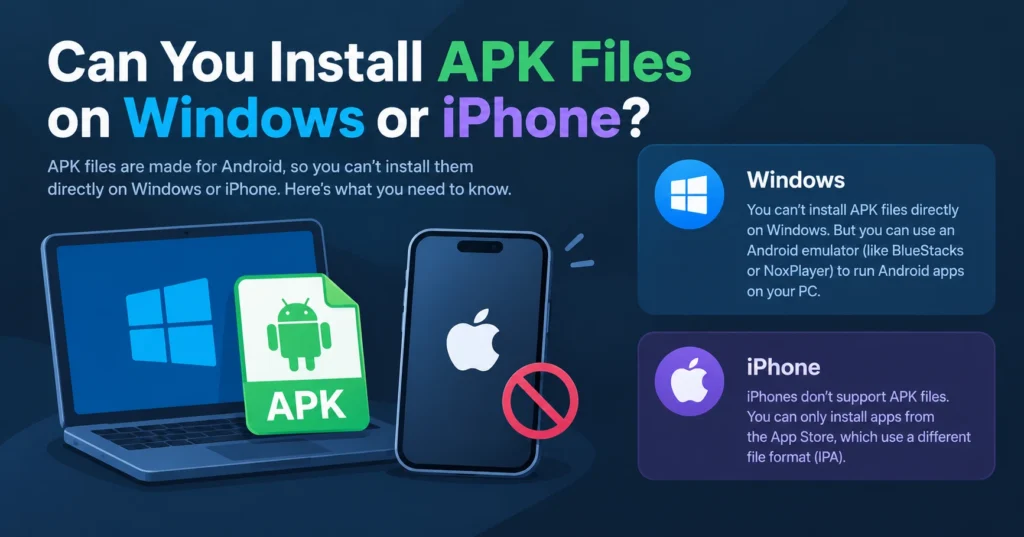
Can APK files be installed on Windows?
An APK is designed for Android, so it is not a normal Windows application.
Windows does not simply install an APK in the same way Android does.
Android applications may be run in certain compatible environments, such as Android emulators, depending on the setup and software being used.
So an APK should not be confused with a Windows .exe installer.
Can You Install an APK on iPhone?
No, an APK cannot normally be installed directly on an iPhone.
APK is an Android package format, while iPhone uses Apple’s iOS application ecosystem.
An Android APK therefore cannot simply be opened and installed on an iPhone like an iOS application.
Are APK Files Safe?
An APK file is not automatically safe or unsafe just because it has the .apk extension.
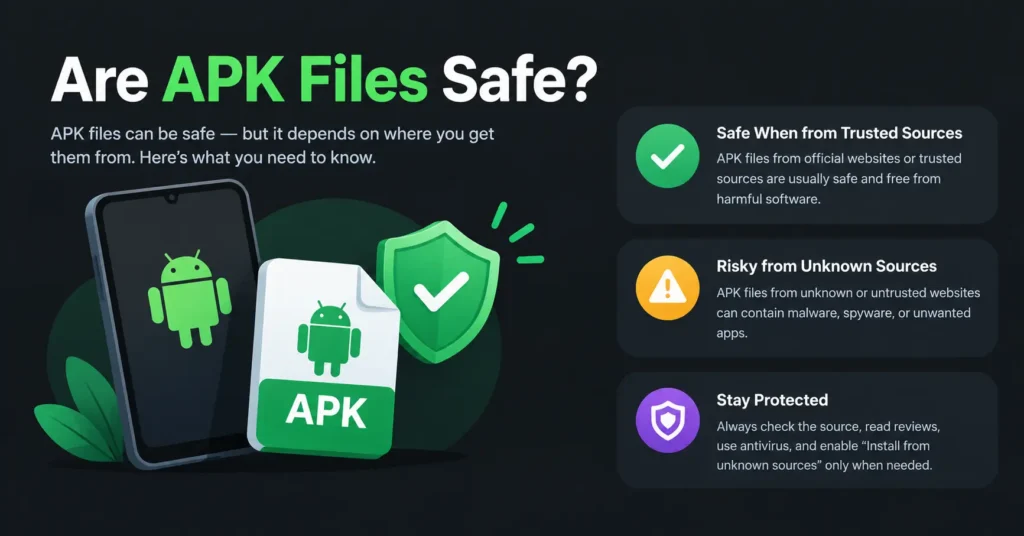
The safety of an APK depends on several factors, including:
- Where it came from
- Who created it
- Whether it has been modified
- What permissions it requests
- Whether its signing information can be trusted
- Whether it contains malicious code
An APK downloaded directly from a trustworthy developer is different from an APK downloaded from an unknown website offering suspicious modifications.
Android’s signing system helps verify application identity and updates, but a valid signature by itself does not guarantee that an application is harmless.
The safest approach is to consider both the source and the application itself.
What Are the Risks of Installing an APK?
Manual APK installation can introduce risks when the file comes from an untrusted source.
Malware and Viruses
A malicious APK can contain harmful code designed to damage a device, spy on activity, or perform other unwanted actions.
Data Theft
A malicious application may attempt to access sensitive information or misuse permissions.
Excessive Permissions
Be careful if an application asks for permissions that do not seem necessary for what it does.
For example, a simple calculator asking for extensive access to contacts and messages deserves closer attention.
Fake Applications
Attackers can create applications that imitate legitimate apps.
A fake APK may use a familiar name or icon to trick users into installing it.
Modified or Tampered APKs
An APK that has been changed by an unknown third party may contain unwanted code or functionality.
Privacy Risks
Some applications may collect more information than users expect.
Review the application’s privacy information and permissions before installation where possible.
Account or Credential Theft
A malicious application may attempt to collect passwords, login information, authentication codes, or other sensitive data.
Device Security Problems
A harmful application can create additional security problems, especially when it receives powerful permissions.
The important point is that not every APK is dangerous. The risk depends heavily on the source, application, permissions, and integrity of the package.
How to Check if an APK Is Safe
There is no single test that can guarantee that every APK is safe, but you can reduce your risk by following several checks.
Download From a Trustworthy Source
Prefer the official developer, a reputable app store, or a trusted distribution channel.
Avoid unknown websites that use misleading download buttons or aggressive pop-ups.
Verify the Developer
Check who created the application.
If the developer name does not match the legitimate application you’re looking for, investigate before installing.
Check the App Name and Version
Make sure the APK matches the application you intended to download.
Look for unusual names, unexpected version numbers, or suspicious file descriptions.
Review Permissions
Check whether the requested permissions make sense.
An app requesting access unrelated to its purpose deserves additional caution.
Scan the APK
You can use reputable security software or malware-scanning services to check a suspicious file.
A scan is useful, but it should not be treated as a guarantee.
Check the Digital Signature
For users who understand Android security tools, comparing signing certificates can help identify whether an APK matches a known release.
Compare With the Official Developer
If the developer publishes information about the app version, package name, checksum, or signing certificate, compare the APK against those details when possible.
Keep Android Updated
Security updates can protect your device against known vulnerabilities.
Keeping Android and your security software updated is an important part of mobile security.
What Is a Modified APK?
A modified APK, sometimes called a mod APK, is an APK that has been changed from its original form.
The changes can range from interface modifications to altered application behavior.
People may use modified APKs for different reasons, but the important security issue is that the modification changes the original package.
This can create uncertainty about:
- Who changed the application
- What was changed
- Whether additional code was added
- Whether user data is handled safely
- Whether the modified version will continue to work correctly
A modified APK should therefore be treated differently from an original APK obtained from the legitimate developer.
Users should also consider the application’s license and the developer’s terms before using modified software.
APK vs XAPK vs APKM
You may encounter other Android-related file formats while downloading applications.
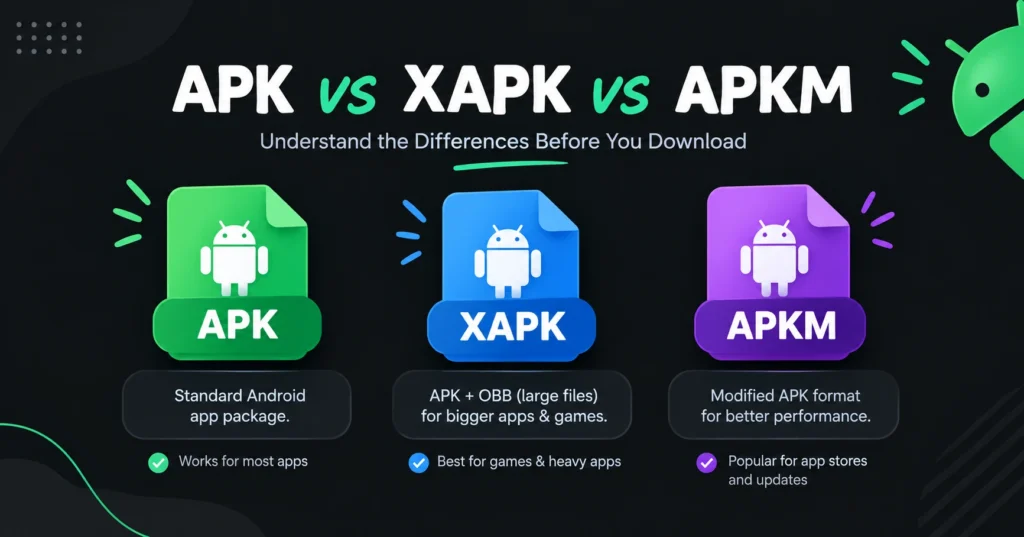
| Format | Basic Purpose | Installation |
|---|---|---|
| APK | Standard Android application package | Can generally be installed directly by Android |
| XAPK | Package/container used by some third-party distribution systems for an app and additional files | May require a compatible installer |
| APKM | Package format used by some distribution systems for split APKs | Usually requires a compatible installer |
The important difference is that a standard APK can normally be handled directly by Android’s package installer, while some alternative formats can contain or represent multiple files needed for an application.
You should use a compatible and trustworthy installer when dealing with formats other than a standard APK.
APK Updates: How Do They Work?
Applications receive updates to add features, fix bugs, improve compatibility, and address security issues.
When updating an Android application, the new package must meet Android’s installation and signing requirements.
For normal app-store installations, the store handles much of this process automatically.
When manually installing an APK update, you need to make sure:
- The APK is compatible with your device
- The application package matches the installed app
- The signing identity is appropriate for an update
- The version is suitable
- The file comes from a trustworthy source
Android uses app signing as part of its update security model. Updates generally need to be associated with the same app signing identity as the installed application.
APK Files and App Permissions
Permissions control what an Android application can access or do on a device.
Depending on the application, permissions may involve:
- Camera
- Microphone
- Contacts
- Location
- Photos and media
- Notifications
- Files or other device resources
Permissions should make sense for the application’s purpose.
For example, a video-calling app may reasonably need camera and microphone access. A simple flashlight application requesting access to contacts would deserve more scrutiny.
Remember that permissions alone do not prove that an application is malicious or safe. They are one part of the overall security picture.
APK Files for Businesses and IT Teams
APK files are not only used by individual Android users.
Businesses can use APKs to distribute custom or internal Android applications to managed devices.
Mobile Device Management (MDM) platforms can provide centralized controls to deploy applications, manage permissions, assign apps to devices, and control application behavior.
For example, NinjaOne’s Android MDM documentation describes uploading custom APK files and applying them through managed application policies.
This can be useful for:
- Internal business apps
- Employee tools
- Inventory applications
- Kiosk devices
- Private applications
- Organization-wide deployments
This is different from a normal user downloading an APK manually because the organization can control distribution and device policies centrally.
Frequently Asked Questions About APK Files
What does APK stand for?
APK stands for Android Package Kit. It is the package format Android uses to distribute and install applications.
What is an APK file used for?
An APK file is used to install an Android application. APKs can also be used for testing, manual distribution, updates, and enterprise app deployment.
Is an APK the same as an app?
No. An APK is the package used to install an Android application. The installed app is the software that runs on your device.
Are APK files safe?
APK files can be safe, but the .apk extension does not guarantee safety. Always consider the source, developer, permissions, signing information, and file integrity.
Can I install an APK on iPhone?
No. APK is an Android package format and cannot normally be installed directly on an iPhone.
Can I install an APK on Windows?
Not as a normal Windows application. APKs are designed for Android. Running Android applications on Windows requires a compatible Android environment or emulator.
Can I delete an APK after installing the app?
Usually, yes. If the app has already been installed successfully, the original APK download is generally no longer required for the installed application to run. You may keep it if you need the installer later.
Why won’t an APK install?
Common reasons include:
The APK is incompatible with your Android version
The package is damaged
Installation from that source is not allowed
There is insufficient storage
The APK is not compatible with your device architecture
A conflicting version of the app is already installed
The package or signature does not meet Android’s requirements
Can APK files contain viruses?
Yes. An APK can contain malicious code if it has been created or modified by an attacker. This is why downloading APKs from unknown sources can be risky.
What is the difference between APK and XAPK?
APK is the standard Android application package format. XAPK is a broader package format used by some third-party distribution systems and may contain an APK along with additional files.
What is a modified APK?
A modified APK is an APK that has been changed from its original version. Because a third party may have altered it, users should consider additional security and privacy risks.
Is downloading APK files legal?
The legality depends on the application, source, license, copyright, and how the APK is distributed or used. Downloading an APK is not automatically illegal, but distributing or modifying copyrighted software can raise legal issues.
Final Thoughts
An APK is the installable package format used by Android applications. It brings together the code, resources, metadata, permissions, and other information needed to install an app on an Android device.
For most people, Google Play handles app installation automatically. But APK files are also useful for developers, testers, businesses, and users who need to install applications through other legitimate channels.
The main thing to remember is that an APK is only a file format. Its safety depends on the application, its source, its integrity, and how it is distributed.
If you choose to install an APK manually, use a trustworthy source, check the application details and permissions, and keep your Android device updated.