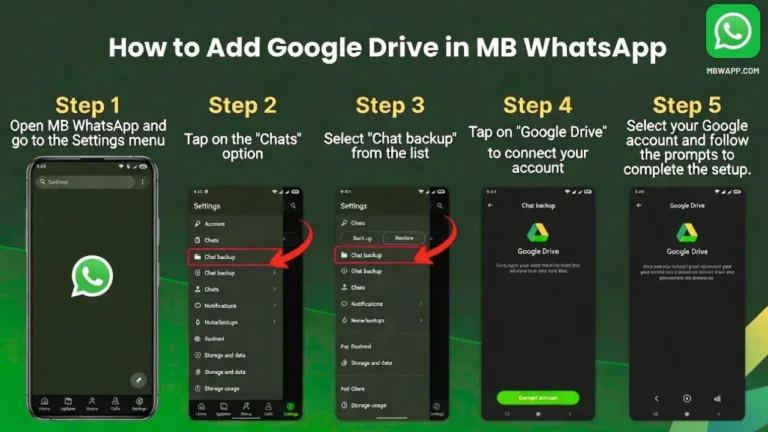
How to recover deleted WhatsApp messages (guide)

Android

If your WhatsApp messages were backed up to Google Drive or included in a local backup:

  1. Uninstall WhatsApp.
  2. Reinstall WhatsApp from the official app store.
  3. Verify the same phone number.
  4. Sign in with the same Google account used for the backup.
  5. When WhatsApp finds the backup, tap Restore.
  6. Wait for the restoration to finish.
how to recover deleted whatsapp messages

iPhone

If you previously backed up WhatsApp to iCloud:

  1. Uninstall WhatsApp mb.
  2. Reinstall it from the App Store.
  3. Verify the same phone number.
  4. Make sure you’re using the same Apple ID/iCloud account.
  5. Tap Restore Chat History when prompted.

Important

If there was no backup from before the messages were deleted, WhatsApp generally cannot restore those messages from its servers.

Also, be careful with apps claiming they can recover any deleted WhatsApp message they may request access to your private notifications or chats.
Similar Posts

  • How to Fix MBWhatsApp Backup Restore Issues

    Many MBWhatsApp users face problems when trying to restore chats, such as “Backup not found”, “Restore failed”, or being stuck at restoring. Don’t worry most of these issues are easy to fix if you follow the right steps. This guide explains why MBWhatsApp backup restore fails and provides step-by-step solutions to fix it safely. Why…

  • How to Fix MB WhatsApp Restore Backup Problem

    Thinking of switching from official WhatsApp to MB WhatsApp? Good choice! MB WhatsApp offers more privacy controls, better customization, and extra features.But before you start exploring, the most important thing is to move your old chats safely. The good news? It’s simple if you follow the steps below carefully. Step 1: Back Up Your WhatsApp…

  • How to Add Google Drive in MB WhatsApp: A Comprehensive Guide

    Hey there, fellow tech enthusiasts! If you’re anything like me, you’re always on the lookout for ways to supercharge your messaging apps. WhatsApp has been a staple in our daily lives for years, but let’s be real sometimes the official version just doesn’t cut it. That’s where mods like MB WhatsApp come into play. This…

Leave a Reply

Your email address will not be published. Required fields are marked *