How to delete WhatsApp Account? (Easy Guide)

Deleting your WhatsApp account permanently removes your account information, profile photo, groups, message history backup associated with the account, and access to WhatsApp services.
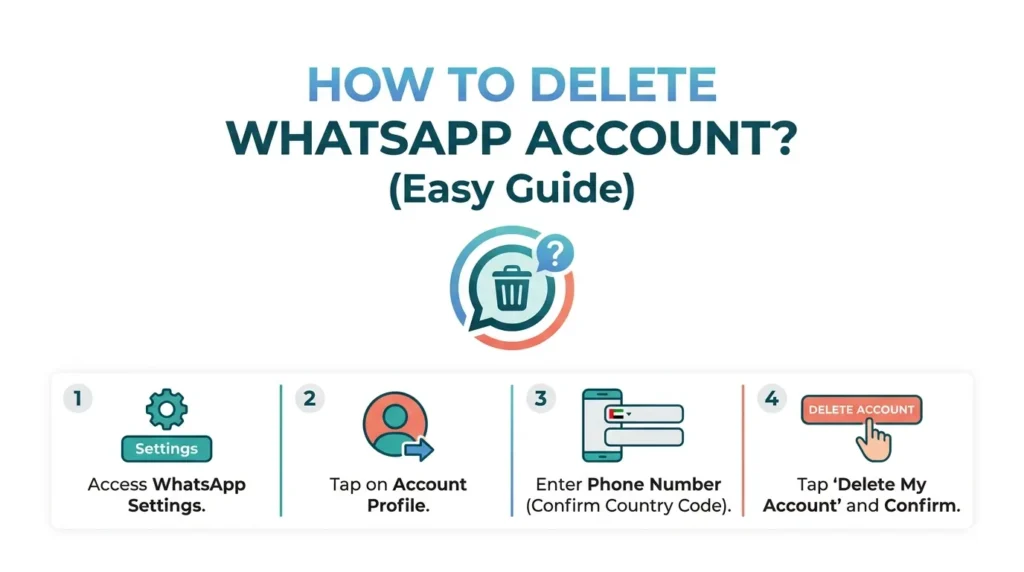
How to delete WhatsApp Account (Easy Guide)

On Android

  1. Open WhatsApp.
  2. Tap the three dots (⋮) in the top-right corner.
  3. Go to Settings > Account.
  4. Tap Delete My Account.
  5. Select your country and enter your phone number in full international format.
  6. Tap Delete My Account.
  7. Choose a reason (optional) and confirm.

On iPhone

  1. Open WhatsApp.
  2. Tap Settings at the bottom right.
  3. Go to Account.
  4. Tap Delete My Account.
  5. Enter your phone number with the country code.
  6. Tap Delete My Account and confirm.

What Happens After Deletion?

  • Your WhatsApp account is permanently deleted.
  • You are removed from all WhatsApp groups.
  • Your chat history on the device is deleted.
  • Your profile photo and account details are removed.
  • Backups linked to the account may be deleted.

Before You Delete

  • Export important chats if you want to keep them.
  • Inform contacts if they may need another way to reach you.
  • Consider uninstalling the app only if you want a temporary break; uninstalling does not delete your account.
Similar Posts

  • MB WhatsApp on PC: The Ultimate Guide to Downloading and Using It on Windows in 2026

    Hey everyone, welcome back to the blog! If you’re like me someone who spends way too much time on WhatsApp but wants more control, cooler looks, and features the official app just won’t give you then MB WhatsApp is probably already on your radar. In 2026, MB WhatsApp (often called MBWA or MBiOS) continues to…

  • MBWhatsApp Chat Lock Guide (2026)

    Privacy has become a daily concern, especially when our phones are often shared with friends, family, or coworkers. That’s where MB WhatsApp stands out. Unlike the official WhatsApp, it offers advanced privacy tools one of the most powerful being chat hiding with security locks. This complete 2026 guide explains how chat hiding works in MBWhatsApp,…

  • How to log out of whatsapp? (Android, iOS , PC,Web)

    WhatsApp is one of the most popular messaging apps worldwide, but many users are surprised to learn that there is no direct “Log Out” button on the mobile version. Whether you’re switching devices, protecting your privacy, or troubleshooting account issues, knowing how to log out of WhatsApp can be useful. In this guide, you’ll learn…

  • How to Fix MBWhatsApp Backup Restore Issues

    Many MBWhatsApp users face problems when trying to restore chats, such as “Backup not found”, “Restore failed”, or being stuck at restoring. Don’t worry most of these issues are easy to fix if you follow the right steps. This guide explains why MBWhatsApp backup restore fails and provides step-by-step solutions to fix it safely. Why…

Leave a Reply

Your email address will not be published. Required fields are marked *