MB WhatsApp | Restore and Backup Your chats
If you’re using WhatsApp on your phone, you can back up and restore your chat history in case your device is lost or you move to a new one. You’re able to create a backup whenever you like or enable automatic backups for extra convenience.
Restore Your chat
To successfully restore your chats, you need to use the same phone number and the same Google Account or iCloud account that you used when creating the backup. This is important because your chat data is connected to these details, and if they don’t match, WhatsApp will not be able to find your backup. When you log in with the correct information, the app will automatically detect your saved chats and give you the option to restore them. We recommend making a fresh backup before uninstalling WhatsApp or switching to a new device, so you don’t lose any recent messages, photos, or videos, and everything stays up to date.
Tips:
- Make sure you have a stable internet connection during backup and restore.
- Check that your device has enough storage space available.
- Keep WhatsApp mb updated to the latest version to avoid errors.
- Ensure your Google Account or iCloud is properly signed in.
- Avoid interrupting the restore process once it starts.
Backup Your Chats
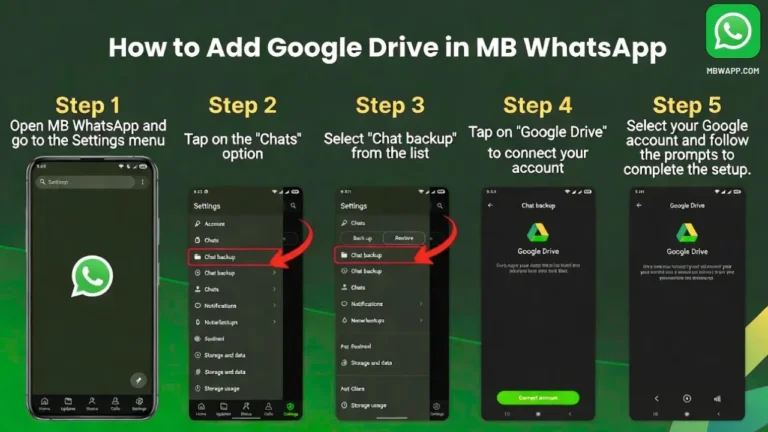
You can back up your chat history using your Google Account on Android devices, or iCloud on iPhone. This allows you to keep your messages, photos, and videos safe in case something happens to your phone. You can choose to back up your data manually at any time or set automatic backups for daily, weekly, or monthly intervals. To avoid the loss of any backups, we recommend backing up your WhatsApp data often so your latest chats and important information are always saved.
WhatsApp Migration
Transfer WhatsApp Chats
- Open WhatsApp on your old phone.
- Go to Settings → Chats → Chat Backup.
- Tap on Back Up to save your chats.
- Install WhatsApp on your new phone.
- Enter and verify the same phone number.
- Tap on Restore when the option appears.
- Wait for the process to finish, and your chats will appear.
Tips:
- Always take a backup before switching phones.
- Use the same phone number and account.
- Make sure you have internet during the process.
- Keep both phones charged.
Read more