How to know if someone blocked you on whatsapp
Ever messaged someone on WhatsApp and just… nothing happened? No reply, no “delivered” tick, no online status. It’s a strange feeling, right? Your brain instantly jumps to one question: “Wait, did they block me?“
Here’s the thing WhatsApp doesn’t make this easy to figure out. There’s no pop-up, no alert, nothing that tells you straight up that you’ve been blocked. But don’t worry. There are a few small clues that, when you put them together, can give you a pretty good idea. Let’s go through them in plain, simple language.
What Happens When Someone Blocks You on WhatsApp?
When someone blocks you, WhatsApp quietly limits what you can see and do with that contact. You won’t get any notification about it, and the other person won’t be told either if you try to check.
Basically, your messages stop reaching them, you stop seeing their updates, and calls won’t go through. It all happens silently in the background which is exactly why it’s so confusing for the person on the other side.
7 Signs Someone May Have Blocked You
None of these signs alone is 100% proof. But if you notice several of them happening at once, it’s worth paying attention.
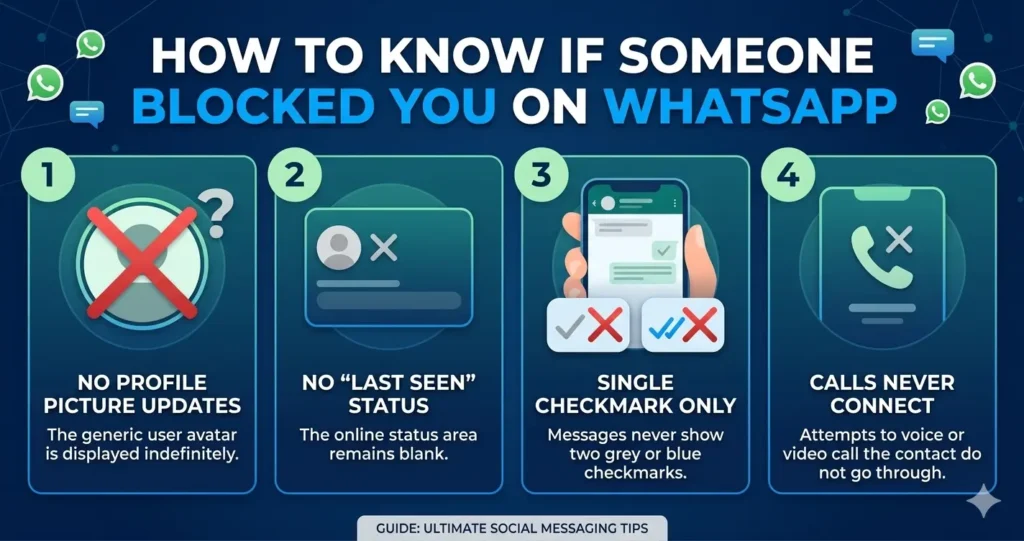
No Profile Picture Update
Take a look at their profile photo. If it hasn’t changed in a long time, or if it suddenly turned into a plain grey icon, that’s a clue worth noting.
This happens because blocked users stop seeing any new profile picture the other person uploads. So the picture just stays frozen or disappears.
Last Seen Not Visible
Open their chat and check the top of the screen. If “last seen” used to show up and now it’s just gone, that’s another sign to watch.
But here’s the catch many people simply hide their last seen in their privacy settings for everyone, not just for you. So this one needs a bit more digging before you jump to conclusions.
Messages Show One Tick Only
This is probably the most well-known sign. You send a message, and it just sits there with a single grey tick, never turning into two.
One tick means your message left your phone but never reached theirs. If this stays the same for a couple of days straight, it’s a fairly strong hint that something’s up.
WhatsApp Calls Don’t Connect
Try calling them on WhatsApp, voice or video, doesn’t matter. If the call just doesn’t connect, or rings for a second and then cuts off, that’s worth noticing.
Blocked calls simply can’t go through to the other person’s phone. It’s one of the more reliable signs on this list.
You Can’t See Online Status
Normally, you can see when your contacts are “online” on WhatsApp. If that little “online” text never shows up anymore, even though you know they use their phone often, that’s another piece of the puzzle.
Just like last seen, this could be a privacy setting too. So treat it as a hint, not solid proof.
You Can’t Add Them to a Group
Try creating a new WhatsApp group and adding that person to it. If you get a message saying you can’t add them because of their privacy settings, that’s interesting.
This doesn’t always mean you’re blocked, though. Some people just turn off “who can add me to groups” for everyone, as a general privacy habit.
Their Status Updates Disappear
Check their WhatsApp Status (the stories-like feature at the top of the app). If you used to see their updates regularly and now there’s nothing at all, that’s another small clue.
Blocked users don’t get to see new status updates from the person who blocked them. So a sudden, total silence here can mean something.
Important Note: Read the Signs Together
Here’s the most important thing to remember: one sign alone doesn’t prove anything. People change their privacy settings, lose their phone, run out of data, or just take a break from WhatsApp all the time.
But if you’re noticing four, five, or all seven of these signs happening at the same time — and it’s been going on for days, not hours then there’s a good chance you’ve been blocked. WhatsApp simply doesn’t give you a clear yes-or-no answer, so reading these signs together is the closest you can get to knowing.
Conclusion
Figuring out if someone blocked you on WhatsApp MB can feel like playing detective with limited clues. The truth is, WhatsApp keeps this information private on purpose, so there’s no official way to confirm it for certain.
The best approach? Look out for these seven signs, give it a few days, and see if the pattern holds. And if it turns out you have been blocked, try to take it easy it usually says more about the other person’s need for space than anything else.